Business Integration Solutions documentation
TIE Kinetix profile
About
A TIE Kinetix profile stores the details needed to connect successfully to the BIS-TIE AS2 app.
To connect to TIE Kinetix Flow, STAEDEAN developed an intermediary web app in conjunction with TIE Kinetix to support the security of messages between all parties.
Setup
Before setting up a profile, deploy the BIS-TIE AS2 app in your Azure tenant. For details, see BIS-TIE AS2 app.
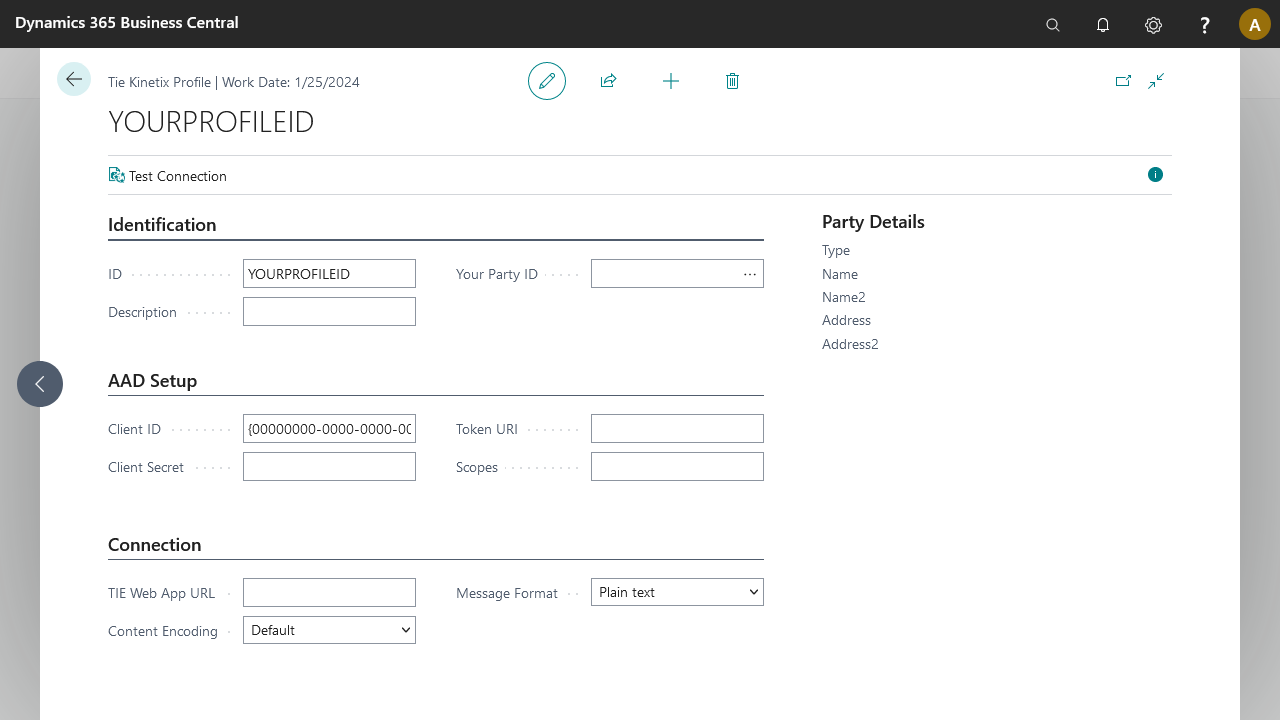
| Setting | Purpose | Initial value |
|---|---|---|
| Identity | ||
| Profile ID | The identifier of the profile. | The first profile is suggested with [Companyname]-TIE. |
| Description | A short description of the profile. | Same as Profile ID. |
| Your Party ID | The party that identifies your company to TIE Kinetix. | |
| AAD Setup | ||
| Client ID | The Client ID of the BIS-TIE AS2 app. | |
| Client Secret | The client secret of the BIS-TIE AS2 app. | |
| Token URI | The URI to the token-generating authority. | |
| Scopes | A list of the required scopes of the BIS-TIE AS2 app. | |
| Connection | ||
| TIE Web App URL | The URL to the BIS-TIE AS2 app. | |
| Content Encoding | The content encoding value to send forward. | |
| Message Format | The message format used to forward data from BC to the BIS-TIE AS2 app. |
Once the setup for your profile is complete, use the Test Connection action to make a test call to your AS2 app.