
Business Integration Solutions SaaS
About: XMLTOTEXTTRANSLATOR activity
In Business Integration Solutions, use the XMLTOTEXTTRANSLATOR activity to convert an XML document to a TEXT document.
Usage
Use this activity to translate an XML document containing data from Business Central into a fixed-length document.
Concept
A fixed-width text file has a specific format that stores textual information in an organized way. Fixed-width text files are a special case of text files where the format is specified by column widths, pad character, and left/right alignment. Column widths are measured in characters. For example, if the first column always has exactly 10 characters, the second has exactly five, and the third has exactly 12, you have a fixed-width text file.
Each row (paragraph) contains one record of information. Each record can contain several pieces of data (fields), and each data field (column) has a precise number of characters. The data is padded with spaces (or any character you specify) if it does not use all the characters allotted to it. Each piece of data can also be left- or right-justified, meaning padding occurs on either side.
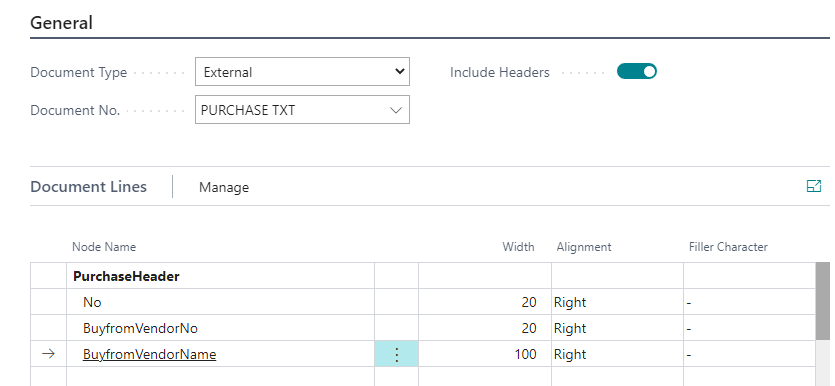
If your company wants to publish data in text format, use the XML to Text Translator activity in your export pipeline. This activity converts the outgoing data into fixed-length format based on a predefined internal/external document. To use this activity, define an internal/external document based on which the outgoing data translates. You can also choose to include headers from your table structure. For each node name, you can define Width, Alignment, and Filler Character.
Limitations and considerations
The XMLTOTEXTTRANSLATOR expects a root node with a list of repeated nodes. When using a Splitter before running this translator, the repeated node before splitting becomes the root node of the newly split documents. This means the translator cannot export data of that record, because it is now the root node.
The XMLTOTEXTTRANSLATOR expects only one block node in the document. As shown in the example above, Purchase Line cannot be used in the document for this translator, because that would mean having several block nodes (represented in bold).
XML input ➡️ [XML to Text Translator] ➡️ [Text output]